Most knowledge base comparisons are written for companies, where the number of readers and the number of paid seats are roughly the same. Higher education breaks that assumption immediately. A registrar publishes to 30,000 students. A department publishes to 400 staff. Nobody is buying 30,000 seats.
So this comparison is organized around the four things that actually decide the purchase on a campus: how the tool is priced, whether it does SSO, whether it can pass an accessibility review, and whether a single department can buy it without a six-month procurement cycle.
A note before the list: HelpKit is our own product. It earns its place here on the first of those four criteria, pricing, and it loses on other criteria to tools further down. Where that happens we say so and name the tool that wins.
The pricing model matters more than the price
This is the part that catches institutions out. Three different models exist, and they behave completely differently at campus scale:
- Per user (seat). You pay for each person with an account. Fine for a 40-person department, impossible for a student body. Confluence, Nuclino and Guru work this way.
- Per author. You pay for the people who write, not the people who read. KnowledgeOwl works this way, and it suits publishing to a large audience.
- Per knowledge base (project). You pay per site regardless of readership. HelpKit works this way.
If your readers are students, the second and third models are the only ones that scale. If your readers are staff who all need edit access anyway, per-seat is fine and often cheaper.
Quick comparison
| Tool | Pricing model | Education pricing | Readers need an account | Best for |
|---|---|---|---|---|
| HelpKit | Per knowledge base | Standard | No | Department sites published from Notion |
| KnowledgeOwl | Per author + per KB | 25% off for nonprofits and purpose-driven orgs | No | Institutions wanting many separate KBs |
| Confluence | Per user | 75% academic discount | Yes | Staff and IT docs, especially on Atlassian |
| Notion | Per member | Free Plus for individuals and student orgs only | Yes | Individual staff and student societies |
| Guru | Custom, sales-led | Case by case | Yes | Large institutions with a verification mandate |
| Nuclino | Per user | Standard | Yes | Small departments and research groups |
| Zendesk Guide | Per agent | Case by case | No | Central IT service desks already on Zendesk |
Pricing checked against vendor pages, August 2026. Verify before procurement; several changed in the last year.
1. HelpKit
Best for: department knowledge bases published from Notion, read by students

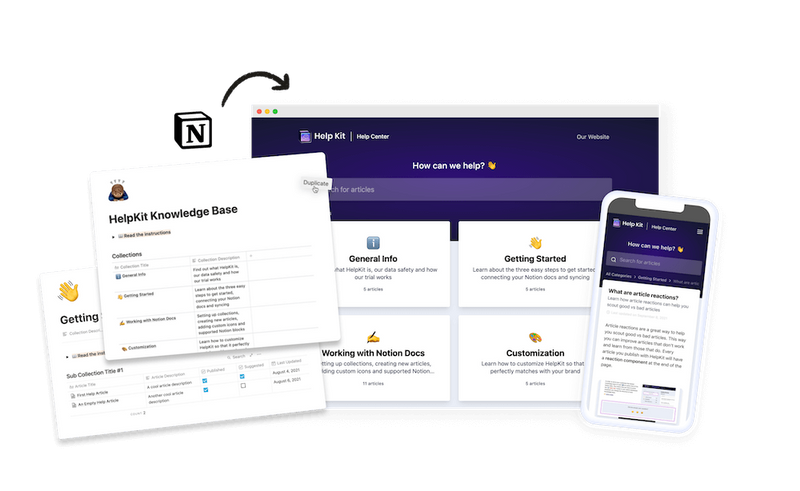
Departments already write their handbooks, policies and procedures in Notion. HelpKit publishes those pages as a searchable site on your own domain, priced per knowledge base rather than per reader, so a page read by 30,000 students costs the same as one read by 30 staff.
MIT is among the institutions running HelpKit, alongside more than a thousand other teams.
For the internal side, JWT authentication means your existing single sign-on decides who gets in: sign in to campus systems and the staff handbook opens, leave and access ends with the account. Public student guides and protected staff SOPs run from the same Notion workspace as separate projects.
What it does well
- Cost does not scale with enrolment, which is the whole problem in higher education
- One site per department, each owned by the team that writes it
- Staff areas behind SSO via JWT; students need no login for public content
- Whoever owns a policy edits it in Notion, with no ticket to the web team
What it doesn't do
- Not a full service desk. There is a contact form for questions the docs don't answer, but no queues, SLAs or agent routing, so a busy IT helpdesk still needs a ticketing system alongside it
- No formal LMS features (enrolments, grading, certificates)
- Notion is the editor, so it suits departments already working there. If your team writes in Word or SharePoint and has no intention of moving, this is a migration rather than a switch
Pricing: per knowledge base. Free 7-day trial, no card.
Skip if: your institution has standardized on Atlassian and only staff will ever read it. Confluence with the academic discount is likely cheaper.
2. KnowledgeOwl
Best for: institutions that need many separate knowledge bases

KnowledgeOwl markets to education directly, including district and campus administration, and the pricing model fits the sector: plans start at $100/month including one author and one knowledge base, with additional authors at $25 and additional knowledge bases at $50 each.
That per-author structure means publishing to a large student population costs nothing extra. The per-KB add-on is what makes it interesting for institutions: several departments can each have their own site under one account.
They also run "KnowledgeOwl for Good", a 25% discount for nonprofits, B Corps and purpose-driven organizations, worth asking about since many institutions qualify.
What it does well
- Purpose-built knowledge base with genuine education focus
- Readers are free; you pay for authors and sites
- HIPAA and GDPR compliance agreements available across tiers
What it doesn't do
- Entry price is higher than the lightweight tools, at $100/month
- Content lives in their editor, so it is another system to maintain
- Their pricing page does not mention WCAG or Section 508, despite marketing to education
Pricing: $100 / $250 / $500 per month, plus $25 per extra author and $50 per extra knowledge base. Enterprise custom.
Skip if: you need one small site and the entry price is more than the problem is worth.
3. Confluence
Best for: staff and IT documentation at Atlassian institutions

If your institution already runs Jira, Confluence is the path of least resistance, and the economics are better than most people assume: Atlassian offers a 75% academic discount for qualifying institutions, including universities, public libraries and affiliated research institutes, applied for through their academic license request form. There is also a free tier for up to 10 users.
At 75% off, per-seat pricing becomes genuinely viable for staff. It does not become viable for students, and Confluence is not built to be a student-facing publication anyway.
What it does well
- Deep academic discount that changes the per-seat math for staff
- Mature permissions and governance, which large institutions need
- Already approved by IT at many universities, which shortens procurement
What it doesn't do
- Still per-user, so student-facing publishing is off the table
- Heavier than departmental teams usually want to administer
- Needs an owner or it sprawls
Pricing: free up to 10 users; Standard from around $6.40/user/month before the 75% academic discount.
Skip if: your readers are students rather than staff.
4. Notion
Best for: individual staff and student organizations

Notion is where an enormous amount of university knowledge is actually written, and its education offer is real but narrower than people assume. Students and educators with a valid school email get a free Plus plan for a single-member workspace, and verified student-led organizations get a free Plus plan for their group.
The important caveat, in Notion's own terms: these plans apply to individuals and verified student organizations, not to entire departments or institutions. A department wanting shared workspaces pays standard per-member pricing. K-12 is excluded from the education plan, though the free plan remains.
For publishing, the same limitation applies as anywhere: a shared page is either fully public or requires an account, with no password in between. That is why institutions typically pair Notion with a publishing layer for anything student-facing.
What it does well
- Free Plus for individual students and educators with a school email
- Free Plus for verified student organizations
- Excellent authoring, and most staff already know it
What it doesn't do
- Education pricing does not extend to departments or the institution
- No password-protected publishing
- Every private reader needs a seat
Pricing: free education plans as above; otherwise per member.
Skip if: you need a department-wide or institution-wide license, or student-facing publishing with access control.
5. Guru
Best for: large institutions where knowledge accuracy is the risk

Guru's differentiator is verification: content has an owner and an expiry, so it gets re-confirmed rather than silently aging. For an institution where wrong information about deadlines, eligibility or compliance carries real consequences, that workflow is worth something.
Guru is now sales-led with custom pricing and no public tiers or self-serve signup. That suits central IT or an administration-wide rollout; it does not suit a department with a small discretionary budget that wants to start this month.
What it does well
- Verification cycles that keep facts current and owned
- Answers surfaced inside the tools staff already use
- Enterprise governance suited to institution-wide deployment
What it doesn't do
- No public pricing, no self-serve start
- Internal-facing; not a student publication tool
- More product than a single department needs
Pricing: custom, via sales.
Skip if: you want to start without a procurement conversation.
6. Nuclino
Best for: small departments, labs and research groups

Nuclino is fast and deliberately minimal, which suits a research group or a small departmental team that wants a shared wiki without administering a platform. The free tier is real but bounded: 50 items, 3 canvases, 2GB storage.
It is internal-facing by design, so treat it as a team wiki rather than anything students will read.
What it does well
- Almost no learning curve, which matters with rotating student staff
- Genuine free tier for small groups
- Fast search and light structure
What it doesn't do
- Item limits on free; per-user pricing beyond it
- Not a publishing platform for student-facing content
- Lighter permissions than institutional tools
Pricing: free tier as above, then per user.
Skip if: you need to publish beyond the team.
7. Zendesk Guide
Best for: central IT service desks already running Zendesk

Plenty of university IT service desks already run Zendesk for ticketing, and Guide is its knowledge base layer. If tickets already flow through it, the case is straightforward: articles sit next to tickets, agents deflect with links, and reporting is unified.
It is priced per agent rather than per reader, so student-facing publishing does not blow up the cost. The catch is that it makes little sense unless you are already in the Zendesk ecosystem, and it brings a support-suite's worth of surface area with it.
What it does well
- Tight integration with an existing Zendesk service desk
- Readers are free; you pay for agents
- Mature multi-brand support for multiple campus services
What it doesn't do
- Hard to justify without the ticketing side
- Heavier and more expensive than a documentation-only tool
- Authoring lives in Zendesk, not where staff usually write
Pricing: per agent, as part of Zendesk's suite pricing. Education terms case by case.
Skip if: you only need documentation.
What universities should actually evaluate
Four questions decide this, and only one of them is about features.
1. Who reads it, and does the price follow them?
Count your real audience before comparing sticker prices. If students read it, rule out per-seat pricing immediately; per-author or per-project models are the only ones that survive. If only staff read it, per-seat with an academic discount may well be the cheapest option available.
2. Does it do SSO, and is that on the plan you can afford?
Staff-facing content behind a separate password is content people will not read, and a credential your IT team has to manage. Ask specifically whether SAML or JWT-based SSO is available on the tier you are actually buying, not just on enterprise.
3. Can it pass an accessibility review?
For public institutions in the US, Section 508 and WCAG 2.1 AA obligations apply to what you publish, so this is worth thinking about before you commit.
How much it features in the buying process depends on how you buy. Institution-wide contracts usually go through a formal review, where accessibility documentation gets requested. Departmental purchases on a card typically do not, which is why plenty of campus knowledge bases get chosen without the topic ever coming up.
Either way, the part you control matters more than the vendor paperwork: a platform can render accessible markup and still produce an inaccessible page if the content skips alt text, uses headings for styling, or hides meaning in link text like "click here". Test a real page from your own content with a keyboard and a screen reader before you roll it out.
4. Can a department buy it alone?
This is the quiet one. Departments usually have small discretionary budgets and no appetite for central procurement. A tool a department head can put on a card this week gets adopted; a tool requiring an institutional contract waits for a budget cycle, and the handbook stays a PDF for another year. Sales-led tools (Guru) and institution-wide platforms are the wrong shape for departmental autonomy.
How to choose
- Department publishing to students, content already in Notion → HelpKit
- Institution wanting many separate knowledge bases → KnowledgeOwl
- Staff and IT docs, already on Atlassian → Confluence with the academic discount
- Individual staff member or a student society → Notion's free education plan
- Institution-wide, accuracy is the risk → Guru
- A single lab or small team → Nuclino
- You already run a Zendesk service desk → Zendesk Guide
How we evaluated these tools
We compared pricing model (not just headline price), SSO availability, education-specific discounts, whether readers require accounts, and whether a single department can purchase independently. Pricing and education terms were checked against each vendor's own pages in August 2026.
Two corrections worth noting, because third-party comparison sites still get both wrong: Guru no longer publishes per-seat pricing and is sales-led, and Notion's education plans do not extend to departments or institutions, only to individuals and verified student organizations.
We did not score accessibility, because compliance depends on your content as much as the platform. Testing a real page from your own knowledge base tells you more than any vendor's documentation.
Frequently asked questions
What is the cheapest knowledge base for a university department? It depends entirely on who reads it. For staff-only documentation at an Atlassian institution, Confluence with the 75% academic discount is hard to beat. For anything students read, per-seat pricing stops making sense and per-author or per-knowledge-base pricing wins by a wide margin, because your reader count no longer appears in the bill.
Does Notion offer a free plan for universities? For individuals and verified student organizations, yes: students and educators with a valid school email get a free Plus plan for a single-member workspace, and student-led organizations can apply for a free group plan. It does not cover departments or the institution, which is the most common misunderstanding.
Can students access a knowledge base without an account? With a published knowledge base, yes: it is a website on your domain that anyone can search and read. Tools that require a seat per reader cannot do this, which is the main structural reason they do not fit student-facing use.
How do we keep staff-only content private? Use SSO. JWT or SAML authentication ties access to accounts you already manage, so nobody maintains a second user list and access ends when an account is deactivated. Password protection works for lower-stakes material, but shared passwords spread.
Do we need one knowledge base or several? Several, usually one per department, is the pattern that holds up. Content ownership stays with the people who know the subject, and readers do not wade through another department's material. That makes per-knowledge-base and per-author pricing more relevant than per-seat.
What about accessibility requirements? Public institutions in the US carry Section 508 and WCAG 2.1 AA obligations for what they publish. Platform capability is only half of it: alt text, heading structure and link text are your responsibility whatever tool you pick, so test a real page with a keyboard and a screen reader rather than relying on a vendor's claim.
Publishing departmental handbooks from Notion? See how universities run a knowledge base per department without per-student pricing. Free 7-day trial, no credit card.

Lena Martinez Support Content Editor
Lena writes about help centers, product documentation and customer self-service. She covers how support teams structure knowledge, what makes an article get read, and where documentation tools actually differ.