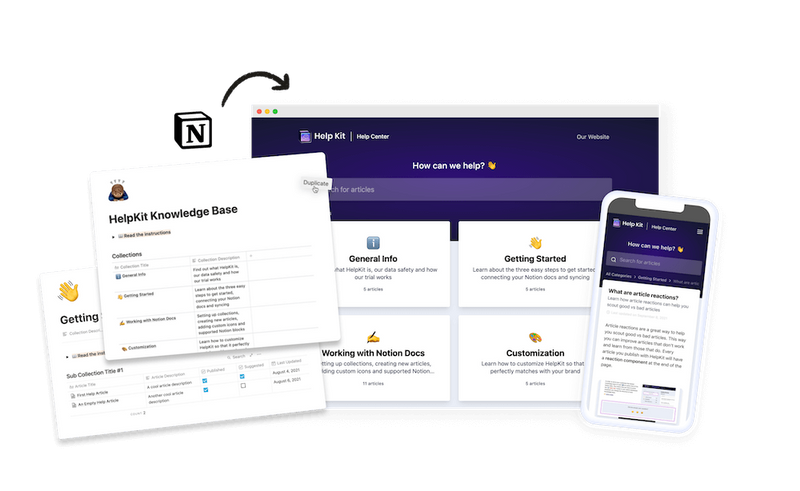
Your team already writes in Notion, and now you need those docs to work as a customer-facing help center. Seven tools can get you there in 2026, and they differ a lot more than their landing pages suggest. This guide compares all of them on the things that decide whether a help center actually deflects support tickets: search, AI-readiness, analytics, design, and how easily your team keeps content current.
One of those seven is ours. HelpKit takes the top spot for a single job, dedicated help centers and documentation, and every other tool gets its genuine strengths and a link to its own site. For other jobs, tools further down this list win, and we say so.
The list
- HelpKit: best for dedicated help centers and documentation from Notion
- Notion Sites: best free option if you just need the page public
- NotionDesk: the closest direct alternative to HelpKit
- Super.so: best for general marketing websites built on Notion
- Notaku: docs-focused builder with multiple site types
- Bullet.so: flexible website builder that can host docs
- Potion: simple Notion website builder
How we compared them
A help center has one job: let customers answer their own question so they don't email you. Publishing the pages is the easy fifth of that job. The other four fifths are what we scored:
- Search. Do visitors find answers, even with typos and their own vocabulary?
- AI-readiness. Can ChatGPT, Claude, and Google's AI read and cite your content (clean markup, llms.txt)? Customers increasingly ask assistants before they ask you.
- Insights. Does the tool show you failed searches, article performance, and feedback so the help center improves over time?
- Design and branding. Custom domain, professional look, fast loading.
- Team editing. Since all these tools use Notion as the editor, they inherit its biggest advantage: support, product, and marketing can all update articles with no developer in the loop. The difference is how fast and reliably changes sync.
One note that applies to everything below: if your team does not write in Notion, none of these tools is the right choice. Pick a traditional knowledge base platform instead; our alternatives hub compares those too.
1. HelpKit
Best for: dedicated help centers and documentation sites

Over a thousand teams publish with HelpKit, including Railway, Softr, Arrows, Opal, Thomas Frank and MIT.
HelpKit is the specialist on this list. It only does help centers and documentation, which shows in what comes out of the box: structured categories and subcategories, full-text search, AI answers trained on your articles, an embeddable widget so answers appear inside your product, article feedback, and analytics that include the searches your visitors ran and didn't find answers for.
It's also built for the AI-search era: published sites ship clean markup and llms.txt, so AI assistants can read and cite your content. And for private content (internal handbooks, client portals, paid resources), it supports password, email list, and JWT-based protected access, which raw Notion pages can't do at all.
Strengths:
- Purpose-built help center structure instead of a generic website
- Search, AI answers, widget, feedback, and insights included
- Fast sync (50 pages in roughly 25 seconds) on a custom domain
- Protected access options up to JWT auth with your own login system
Limitations:
- Help centers and docs only. If you want to build your marketing site or portfolio from Notion, use Super or Bullet instead
- No built-in ticketing; it reduces tickets rather than managing them
Verdict: if the goal is a help center that measurably cuts support volume rather than a website that happens to hold docs, this is the tool the rest of the list gets compared against. Free 7-day trial, no credit card.
2. Notion Sites
Best for: getting a page public for free

Notion can publish pages to the web itself, and for a quick FAQ this is genuinely fine: zero cost, zero new tools, instant updates. We wrote a full breakdown of using Notion Sites as a help center.
The limits arrive with your first serious requirement. The published page looks like Notion rather than your product, structure is whatever your page hierarchy happens to be, there are no help-center analytics, no widget, no article feedback, and no access protection. Search and navigation are basic, and there's no way to see what visitors looked for and didn't find.
Verdict: the right starting point when a help center is still a nice-to-have. Most teams on this list started here and moved when ticket deflection started to matter.
3. NotionDesk
Best for: teams that want a direct HelpKit alternative

NotionDesk is the closest thing to HelpKit on this list: a dedicated Notion-to-help-center tool rather than a general website builder, and it's actively developed. It covers the fundamentals well: turn a Notion workspace into a structured, searchable help center on your domain.
At the time of writing its feature set is leaner than HelpKit's around analytics depth, AI features, and protected access options, so check their current site when you evaluate. We keep an up-to-date HelpKit vs. NotionDesk comparison as part of our alternatives hub.
Verdict: worth having on your shortlist for a dedicated help center tool. Compare the current feature lists side by side for the capabilities you specifically need.
4. Super.so
Best for: marketing websites built on Notion

Super is probably the best-known Notion website builder, and for good reason: it turns Notion pages into fast, clean, general-purpose websites with custom domains and themes. If you want your whole marketing site running on Notion, Super is a strong choice.
As a help center specifically, you feel its generality. There's no structured article organization, no embeddable support widget, no help-center analytics, and sync can take minutes on larger sites. You can absolutely ship a docs-shaped website with it; you just build and maintain the help-center behavior yourself. Full comparison: Super.so alternative.
Verdict: pick Super for websites, not for support. If the same tool must do both, decide which job you're willing to compromise on.
5. Notaku
Best for: teams wanting multiple site types from one tool

Notaku builds several site types from Notion: docs, blogs, changelogs, and roadmaps. That breadth is its pitch, and if you want all of those from one subscription, it's the only tool on this list that does it.
For help centers specifically, it takes a general documentation approach: no embeddable widget, no search intent tracking, and no support-focused analytics. Worth knowing before you commit: the pace of updates has visibly slowed lately, so review their changelog as part of your evaluation. Full comparison: Notaku alternative.
Verdict: interesting if you need docs plus changelog plus roadmap in one place and can live without support-specific features.
6. Bullet.so
Best for: flexible Notion websites with custom design control

Bullet serves blogs, portfolios, landing pages, and docs from Notion, with more design flexibility than most builders in this category. Teams that care about pixel-level control of their Notion-powered site tend to like it.
As with the other general builders, help-center essentials are missing: no AI-powered search, no widget, no article reactions or feedback collection, and website-level analytics rather than support metrics. Full comparison: Bullet alternative.
Verdict: a website builder first. Choose it for design flexibility, not for ticket deflection.
7. Potion
Best for: simple Notion websites at a low price point
Potion is a straightforward Notion website builder: connect your pages, get a website with your domain. For basic sites it does the job with little fuss.
It's the least help-center-ready tool on this list: no support-specific features, basic functionality, and a design approach that has fallen behind the newer builders. Development activity has been limited compared to the specialized platforms. Full comparison: Potion alternative.
Verdict: fine for a simple website. For a help center, every other tool here serves you better.
Side-by-side comparison
| HelpKit | Notion Sites | NotionDesk | Super | Notaku | Bullet | Potion | |
|---|---|---|---|---|---|---|---|
| Purpose-built for help centers | Yes | No | Yes | No | Partly (docs) | No | No |
| Full-text search | Yes | Basic | Yes | No | Yes | No | No |
| AI answers for visitors | Yes | No | Check current | No | No | No | No |
| llms.txt / AI-ready output | Yes | No | Check current | No | No | No | No |
| Embeddable widget | Yes | No | Check current | No | No | No | No |
| Failed-search insights | Yes | No | Check current | No | No | No | No |
| Protected access (password/email/JWT) | Yes | No | Check current | No | No | No | No |
| Custom domain | Yes | Paid Notion plans | Yes | Yes | Yes | Yes | Yes |
| Also builds general websites | No | Partly | No | Yes | Partly | Yes | Yes |
"Check current" = actively developed tool; verify against their latest feature list. Table verified August 2026.
Frequently asked questions
What's the best way to create a help center from Notion? Write your articles in Notion using a structured knowledge base template, then publish them with a dedicated tool like HelpKit, which adds search, AI answers, analytics, and your custom domain on top. The whole setup takes about 15 minutes once your articles exist.
Can I just use Notion's built-in publishing? Yes, and for a small FAQ it's a fine start. You give up branding, search quality, analytics, access protection, and AI-readiness, which is why most teams outgrow it once support volume matters.
Do these tools cost money? All except Notion Sites are paid subscriptions, most with free trials. Prices change often enough that we'd rather not print numbers that go stale; check each tool's pricing page, and see HelpKit's pricing here.
Why does AI-readiness matter for a help center? A growing share of customers ask ChatGPT, Claude, or Google's AI before contacting support. Those assistants can only cite content they can crawl and parse. A help center that serves clean markup and llms.txt gets quoted with answers about your product; one that doesn't is invisible in those conversations.
Which tool is best if my team doesn't use Notion? None of these. Every tool on this list uses Notion as the editor, which is their superpower for Notion teams and a dealbreaker for everyone else. Start with our guide to the best GitBook alternatives, which covers markdown, open-source, and enterprise options, or browse the full alternatives hub.
Ready to see your Notion docs as a real help center? Start a free 7-day trial, connect your workspace, and you'll be looking at your own help center in about 15 minutes.

Lena Martinez Support Content Editor
Lena writes about help centers, product documentation and customer self-service. She covers how support teams structure knowledge, what makes an article get read, and where documentation tools actually differ.