Most internal wiki comparisons list features and leave you to work out which of them matter. This one starts somewhere else, with the question that actually decides the tool: is your handbook read only by your team, or by people outside it too?
Get that wrong and you either pay per seat for people who never do anything but read, or spend a year fighting software that was never built to face outward. So the seven tools below are sorted by that distinction rather than by feature count.
One of the seven is ours. HelpKit appears in the lane it genuinely fits, with its limits stated, and where an internal-only wiki is the better answer we name the tool that beats it.
Pick your lane first
Lane 1: internal only. Everyone who reads the handbook is on your team and can have an account. Engineering runbooks, meeting notes, project docs. You want fast editing, good search, and Slack integration. Seat-based pricing is fine because seats and readers are the same number.
Lane 2: published to a defined audience. Your handbook is read by employees plus contractors, franchisees, seasonal staff, client teams, or a support org that shouldn't be in your workspace. Here seat-based pricing punishes you: you're paying per reader for content they only consume. What you want is a published site with access control.
Most teams assume Lane 1 and discover Lane 2 the first time a contractor asks for the onboarding doc.
Quick comparison
| Tool | Best for | Pricing model | Free tier | Readers need an account |
|---|---|---|---|---|
| HelpKit | Handbooks read beyond the core team | Per project | 7-day trial | No |
| Notion | Teams already living in Notion | Per member | Yes | Yes |
| Nuclino | Lightweight, fast internal wikis | Per user | Yes (50 items) | Yes |
| Slab | Clean docs with strong search | Per user | Yes | Yes |
| Tettra | Slack-heavy teams | Per user, 10-seat min | Trial only | Yes |
| Confluence | Enterprises already on Atlassian | Per user | Yes (small teams) | Yes |
| Guru | Verified knowledge at scale | Custom / sales-led | No | Yes |
Pricing checked August 2026. Vendors change plans often; confirm before you commit.
1. HelpKit
Best for: handbooks that people outside your workspace need to read

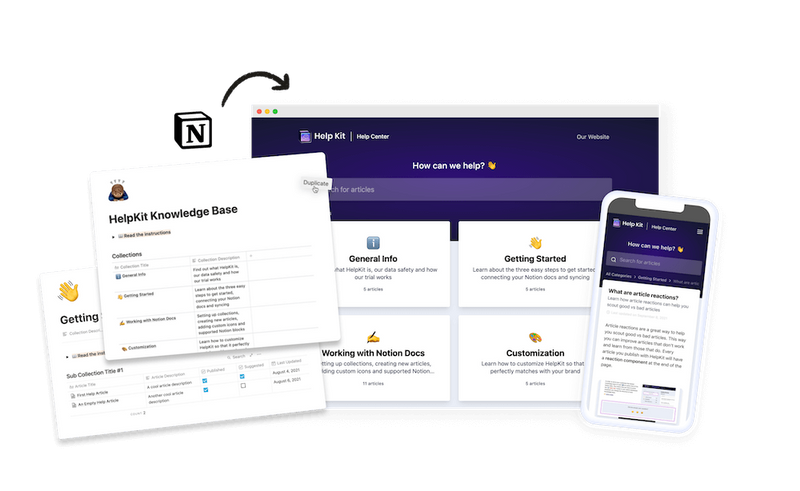
HelpKit is the Lane 2 answer. You write the handbook in Notion, and HelpKit publishes it as a real site on your own domain, then locks it down: a single password, an approved email list, or JWT authentication so your existing company login decides who gets in.
That last option is the one internal teams end up needing. If someone is signed in to your systems they can read the handbook; when they leave and you deactivate the account, access goes with it. No separate user list to maintain.
What it does well
- Readers need no account in your workspace, so cost doesn't scale with headcount
- Three levels of access control, including JWT via your own login
- Full-text search and AI answers trained on your handbook
- Edits happen in Notion, so whoever owns a policy updates it directly
What it doesn't do
- It publishes rather than replacing your workspace: real-time collaborative editing stays in Notion
- No Slack-native answer bot for internal Q&A the way Tettra and Guru have
- If your handbook is read only by people who already have Notion seats, this is a layer you may not need
Pricing: per project, not per reader. Free 7-day trial, no card.
Skip if: your team is small, everyone already has a Notion seat, and nobody outside reads the docs. Then plain Notion is enough.
2. Notion
Best for: teams whose whole operation already lives there

Notion is where most handbooks actually get written, and for internal use it's genuinely excellent: flexible databases, good editing, and everything in one workspace. If your team is already in Notion every day, the handbook has zero adoption cost.
The friction shows up at the boundary. Sharing a page publicly makes it fully public, with no password (Notion's own docs are explicit that password protection isn't available). Sharing privately means every reader needs an account. There's no middle setting, which is exactly the gap Lane 2 tools fill. We covered the specifics in publishing a Notion page to the web.
What it does well
- No new tool to adopt for teams already using it
- Databases and relations handle structured handbook content well
- Strong editing and templating
What it doesn't do
- No password protection on published pages
- Every private reader needs a seat
- Published pages carry Notion's look, not your brand
Pricing: free for personal use, per-member on team plans.
Skip if: people outside your workspace need to read it.
3. Nuclino
Best for: small teams that want speed over features

Nuclino is deliberately minimal and very fast. Pages, a graph view, a board view, and search, without the configuration surface of a full workspace. Teams who found Confluence heavy usually feel relief here.
The free tier is real but bounded: 50 items, 3 canvases, 2GB storage. That's enough to evaluate it and enough for a genuinely small handbook, but a growing wiki hits the item ceiling fairly quickly.
What it does well
- Fast, clean, almost no learning curve
- Graph and board views for relationships between docs
- Meaningful free tier
What it doesn't do
- Item limits on free; storage tiers per user beyond that
- Lighter permissions and publishing than heavier tools
- Internal-facing by design
Pricing: free tier as above, paid plans per user (Nuclino doesn't publish paid rates on its pricing page, so check in-app).
Skip if: you need to publish externally, or you'll cross 50 items soon and want a free ride.
4. Slab
Best for: readable documentation with search that behaves

Slab's pitch is that documentation should be pleasant to read, and it delivers: clean typography, sensible structure, and unified search that reaches into connected tools like Slack, GitHub and Google Drive, so people find answers without knowing which system holds them.
It's the most "designed" tool in this group, which matters more than it sounds for a handbook nobody is required to read.
What it does well
- Genuinely good reading and writing experience
- Unified search across integrated tools
- Simple structure that doesn't need an admin
What it doesn't do
- Fewer database-style features than Notion or Confluence
- Internal-facing; not a publishing platform
- Per-user pricing on paid tiers
Pricing: free tier available, paid plans per user (commonly cited around $6 to $8 per user per month annually; verify current rates).
Skip if: you need structured databases or external publishing.
5. Tettra
Best for: teams that live in Slack

Tettra's whole design assumes questions get asked in Slack. Its bot answers from your wiki inside the channel, routes unanswered questions to the right expert, and flags stale pages for verification. For a company where "just ask in #general" is the default behavior, that's the right shape.
The catch is the floor: the Scaling plan is $8 per user per month with a 10-user minimum, so a five-person team pays for ten. There's a 30-day trial.
What it does well
- Slack-native Q&A and answer routing
- Content verification workflows that fight staleness
- Straightforward, focused product
What it doesn't do
- 10-seat minimum makes it expensive for very small teams
- Less useful if your team isn't Slack-centric
- Internal-facing
Pricing: $8/user/month, 10-user minimum, 30-day trial. Enterprise is custom.
Skip if: you're under ten people, or Slack isn't where your questions happen.
6. Confluence
Best for: companies already standardized on Atlassian

If your engineering org runs on Jira, Confluence is the path of least resistance: tickets link to specs, permissions inherit from an existing structure, and IT already approved it. At enterprise scale, its permission model and admin controls are more capable than anything else on this list.
The cost is weight. Confluence assumes someone will own spaces, templates and permissions. Small teams frequently find it does more than they need, in more steps than they want. There's a free tier for small teams.
What it does well
- Deep Jira and Atlassian integration
- Mature permissions, governance and admin tooling
- Free tier for small teams
What it doesn't do
- Heavier interface and setup than the lightweight options
- Usually needs an owner to stay tidy
- Publishing externally is not its strength
Pricing: free for small teams, then per user.
Skip if: you're not already in the Atlassian ecosystem.
7. Guru
Best for: larger orgs that need knowledge verified, not just stored

Guru's distinctive idea is verification: every card has an owner and an expiry, so knowledge is periodically re-confirmed rather than quietly rotting. It surfaces answers in the tools people already use through browser extension and integrations, which suits support and sales teams answering repeat questions.
Guru is now sales-led with custom pricing, with no public tiers, no self-serve free plan. That positions it above the small-team bracket, and third-party sites quoting per-seat figures are out of date.
What it does well
- Verification workflows that keep content trustworthy
- Answers surfaced inside other tools
- Strong fit for larger support and sales orgs
What it doesn't do
- No public pricing or self-serve signup
- More product than a small team needs
- Internal-facing
Pricing: custom, via their sales team.
Skip if: you want to sign up today and see a price.
What actually matters for a handbook
After the feature lists, four things decide whether a handbook gets used:
1. Who has to read it. The one question that picks your lane. Count contractors, franchisees, seasonal staff and client teams before choosing seat-based pricing.
2. Whether the owner can edit it alone. A handbook that needs a technical helper to update is a handbook that goes stale. Whoever owns a policy should be able to change it in under a minute.
3. Whether search works for people who don't know your vocabulary. New hires search for "time off", not "PTO Policy v3". If search only matches titles, they'll ask a human instead.
4. Whether it stays current. Verification (Guru, Tettra) or trivially cheap editing (Notion, HelpKit) both solve this. Nothing else does.
How to choose
- Everyone who reads it has a seat, and you're in Notion → stay in Notion
- Everyone has a seat, you want lighter and faster → Nuclino or Slab
- Questions happen in Slack → Tettra, if you're over 10 people
- You're already on Atlassian → Confluence
- Large org, knowledge accuracy is the risk → Guru
- Readers include people outside your workspace → HelpKit
How we evaluated these tools
We compared each tool on access model (who can read without a seat), editing friction for non-technical owners, search quality, staleness controls, and pricing structure. Pricing was checked against each vendor's own pricing page in August 2026, not third-party aggregators, several of which still list per-seat figures for Guru, which has since moved to custom pricing.
We didn't score design or "ease of use" as standalone categories, because both are subjective and every tool here demos well. Trials are free or cheap; run two.
Frequently asked questions
What's the difference between an internal wiki and an employee handbook? A handbook is a specific document set: policies, benefits, onboarding, how the company works. An internal wiki is the broader system holding that plus runbooks, project docs and meeting notes. Most teams keep both in one tool, and the handbook is simply the part that non-employees are most likely to need.
Do we need a separate tool if we already use Notion? Only if people outside your workspace read it. Notion is a strong internal wiki. The gap is publishing: a shared page is either fully public or requires an account, with no password option in between. If contractors or franchisees need access, you need a layer on top, which is what publishing your Notion handbook as a portal does.
How do we keep an employee handbook from going stale? Give every section an owner, and pick a tool where updating takes a minute. Formal verification workflows (Guru, Tettra) work at scale; for smaller teams, low editing friction is more effective than process, because the update actually happens.
Can an internal wiki be public and private at the same time? Not within one document set in most tools. The usual pattern is two projects from the same source: public content published openly, internal content behind protected access. That keeps one place to write and two audiences served.
Which of these is cheapest for a small team? Nuclino and Confluence both have real free tiers, and Notion is free for personal use. Watch for floors rather than rates: Tettra's 10-seat minimum means a 5-person team pays double the sticker price. Per-project pricing avoids the seat math entirely when most readers only consume.
Running this for a university or college? Per-seat pricing breaks down fast at campus scale, so we compared the options separately in best knowledge base tools for universities.
Writing your handbook in Notion already? See how to publish it as a secure portal your whole team can read without a Notion account. Free 7-day trial, no credit card.

Lena Martinez Support Content Editor
Lena writes about help centers, product documentation and customer self-service. She covers how support teams structure knowledge, what makes an article get read, and where documentation tools actually differ.