The Help Center Launch Checklist: 9 Steps Before You Go Live
 Lena Martinez 7 min read
Before your help center goes live, it should pass nine checks: clear goals, organized information, accurate articles, usable design, a plan to keep content current, a feedback option, accessibility on every device, a promotion plan, and a way to measure whether any of it works. Miss one and the help center still launches; miss three and it quietly becomes the page nobody visits.
This chapter walks through each item with the questions to ask yourself. It doubles as a health check for a help center you've already launched.
1. Define goals and objectives
Know what the help center is for before you write a word. "Improve customer satisfaction" and "reduce support inquiries" sound similar but lead to different content: the first prioritizes onboarding guides and polish, the second prioritizes covering your top ticket drivers.
Ask: which questions, if answered publicly, would save us the most time next month? That list is your launch scope. Everything else can come later.
2. Organize information
Structure your help center so customers find what they need through either a navigation menu or a search bar, because visitors use both. If you haven't settled your categories yet, the four-category structure covers most products: Getting Started, Billing & Subscription, Troubleshooting, Profile & Account.
Ask: could a stranger predict which category holds a given article? Test it on someone outside the team.
3. Provide accurate information
Comprehensive beats clever. Each article needs current, correct, step-by-step instructions, and troubleshooting guides need to reflect the product as it is today, not as it was two releases ago.
Ask: did someone actually perform each how-to, step by step, against the live product this week? Screenshots from an old interface fail this check.
4. Design for usability
Clear headings, short paragraphs, helpful images or videos where the interface is involved. The writing chapter covers the details; the checklist version is simply that every article should be skimmable by a stressed person in a hurry.
Ask: can a reader find their step without reading the whole article?
5. Keep it current
Decide now, before launch, how updates will happen. The decay is what kills help centers: the product changes, the articles don't, and six months later customers trust none of it.
The practical fix is making updates cheap. If your articles live where your team already writes, updates actually happen. That's the argument for running your help center from Notion: editing an article is editing a Notion page, and with HelpKit the public site syncs from there.
Ask: when a feature ships, whose job is it to update the articles it touches?
6. Offer feedback options
Include a way for customers to tell you whether an article helped, at minimum a thumbs up or down, ideally with an optional comment. This feeds the measurement loop and catches broken articles before they mislead a hundred more readers.
Ask: when an article fails someone, how would we ever find out?
7. Ensure accessibility
Your help center must work on every device type and screen size, and it should be compatible with assistive technologies. People often read help articles on a phone while your product misbehaves on their laptop. Check contrast, check font sizes, check that images have alt text.
Ask: open your three most important articles on a phone. Are they genuinely readable?
8. Promote the help center
A help center nobody finds deflects nothing. Give it a plan:
- Link it prominently on your website and inside your product
- Put the link in support email signatures and auto-replies
- Add a help widget so answers appear inside your product, right where questions arise
- Mention new guides in your changelog or newsletter when you ship them
Ask: from the screen where a customer usually gets stuck, how many clicks to the relevant article?
9. Measure effectiveness
Track whether the help center does its job, using metrics like customer satisfaction scores, article views, and searches. The full loop is in chapter 5, but the launch-day requirement is simply that tracking exists: you can't improve a help center you can't see.
Ask: one month from launch, what number will tell us this worked?
The checklist, compressed
For your launch day, the whole chapter in nine lines:
- Goals defined, launch scope is the top ticket drivers
- Categories a stranger could predict
- Every how-to verified against the live product
- Every article skimmable
- An owner for keeping content current
- Feedback buttons on every article
- Readable on a phone, accessible to everyone
- Linked from site, product, and support emails
- Metrics collecting from day one
Run through it, fix what fails, and ship. A help center that passes these nine checks on launch day, plus a monthly half-hour review, will quietly compound into one of the most valuable pages your company owns.
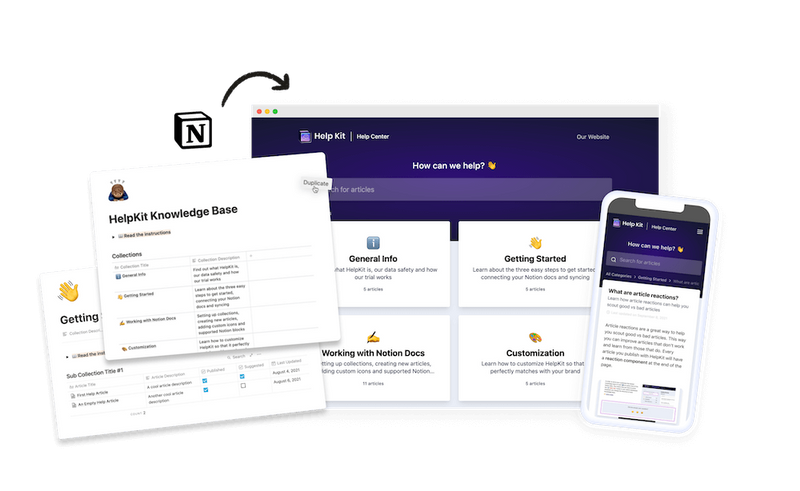
If you're starting from scratch and your team writes in Notion, our knowledge base template gives you checks 2 and 4 out of the box, and HelpKit handles search, the widget, feedback, and analytics for the rest.
Common questions
How long does it take to launch a help center? With content ready, days, not weeks. The writing is the real work, and the ten-article rule from chapter 1 keeps that honest: launch with your ten most-asked questions covered well.
Should I launch publicly or to a small group first? A soft launch works well: share the help center in support replies for a week or two before linking it sitewide. Real customers with real problems will find the gaps faster than any internal review.
What's the most commonly skipped step? Number 5, keeping it current. Almost everyone launches with accurate articles; the difference shows six months later, and it's decided by whether updating is someone's job and cheap to do.